- Published on
Facebook Request Throttle: a community-driven WordPress plugin

- Authors

- Name
- Nadim Tuhin
- @nadimtuhin
On this page
Your WordPress site is suddenly slow. You check the access logs and find thousands of requests from facebookexternalhit. Facebook's crawler is hammering your server every time someone shares a link. Sound familiar?
This is the story of how a quick fix for a friend turned into an open-source plugin that now helps WordPress sites manage aggressive crawler traffic.
TL;DR: what this plugin does
| Problem | Solution |
|---|---|
| Facebook crawler overwhelming your server | Configurable request throttling |
| No visibility into crawler behavior | Built-in logging system |
| Images getting blocked unexpectedly | Smart request filtering |
| Other aggressive bots | Multi-bot protection |
The problem: Facebook's aggressive crawler
When someone shares a URL on Facebook, their crawler (facebookexternalhit/1.1) fetches the page to generate a preview. Sounds harmless, until you realize:
- Facebook re-crawls pages frequently to keep previews fresh
- Multiple shares trigger multiple crawl requests
- Viral content can mean hundreds of requests per minute
- Shared hosting plans can't handle the load
A friend's WordPress site was experiencing exactly this. Their shared hosting provider was threatening to suspend the account due to resource usage. The culprit was Facebook's crawler making requests faster than the server could handle.
The solution: request throttling
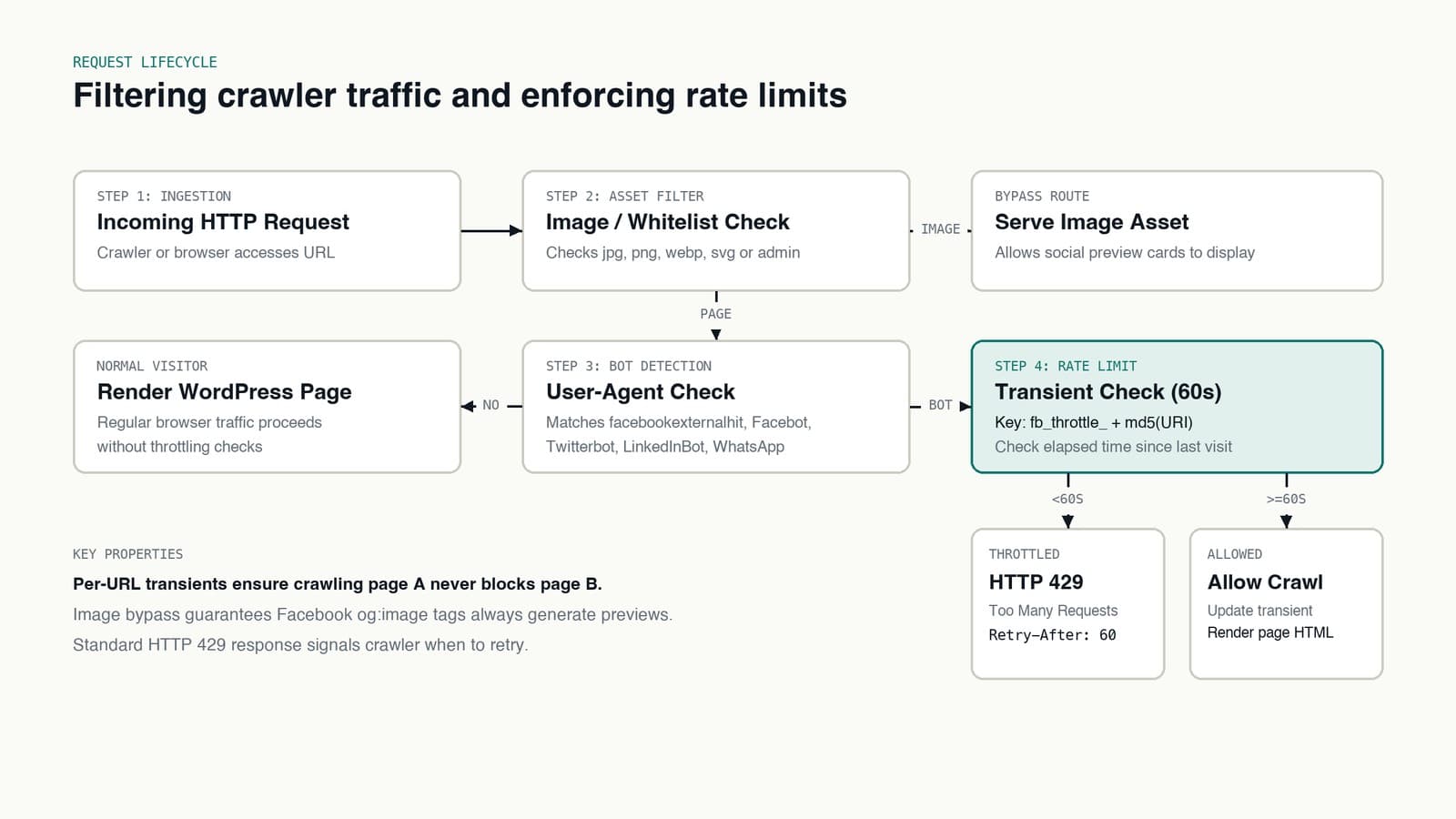
The core concept is simple: track when Facebook's crawler last accessed your site, and if it's too soon, respond with a temporary error instead of rendering the full page.
Here's the essential logic:
function check_facebook_throttle() {
    $user_agent = $_SERVER['HTTP_USER_AGENT'] ?? '';

    // Detect Facebook's crawler
    if (strpos($user_agent, 'facebookexternalhit') === false) {
        return; // Not Facebook, proceed normally
    }

    // Get the URL-specific cache key to allow multiple pages to be crawled
    $request_uri = $_SERVER['REQUEST_URI'] ?? '/';
    $cache_key = 'fb_throttle_' . md5($request_uri);

    $throttle_seconds = get_option('fb_throttle_seconds', 60);
    $last_access = get_transient($cache_key);

    if ($last_access && (time() - $last_access) < $throttle_seconds) {
        // Too soon. Tell Facebook to retry later.
        // Use 429 (Too Many Requests) which is the proper rate-limiting status
        header('HTTP/1.1 429 Too Many Requests');
        header('Retry-After: ' . $throttle_seconds);
        exit;
    }

    // Record this access
    set_transient($cache_key, time(), $throttle_seconds * 2);
}

add_action('init', 'check_facebook_throttle', 1);
Key implementation notes:
- Uses per-URL cache keys so crawling page A doesn't block page B
- Uses HTTP 429 (Too Many Requests) instead of 503, which is the standard rate-limiting response
- The plugin uses WordPress's Transient API to store access times, so no extra database tables are needed, and it works with object caching if you have it
Evolution through community feedback
Issue #1: Images getting blocked
A user reached out via Facebook message (ironic) reporting that their images weren't appearing in Facebook previews. The problem was the plugin blocking all Facebook crawler requests, including those fetching og:image assets.
The fix required detecting image requests:
function is_image_request() {
    $request_uri = $_SERVER['REQUEST_URI'] ?? '';

    // Parse the path without query strings
    $path = parse_url($request_uri, PHP_URL_PATH) ?? '';

    // Check for image extensions
    $image_extensions = ['jpg', 'jpeg', 'png', 'gif', 'webp', 'svg'];
    $extension = strtolower(pathinfo($path, PATHINFO_EXTENSION));

    return in_array($extension, $image_extensions, true);
}
Now image requests bypass the throttle, ensuring previews display correctly.
Issue #2: "What's actually happening?"
The same user asked how to see what the plugin was doing. Fair question. Throttling is invisible by default. This led to adding a logging system:
function log_throttle_event($action, $user_agent) {
    if (!get_option('fb_throttle_logging', false)) {
        return;
    }

    // Sanitize user agent to prevent log injection
    $safe_user_agent = preg_replace('/[^\x20-\x7E]/', '', $user_agent);
    $safe_user_agent = substr($safe_user_agent, 0, 100);

    // Get real IP (check forwarded headers for proxies/CDNs)
    $ip = $_SERVER['HTTP_X_FORWARDED_FOR'] ?? $_SERVER['REMOTE_ADDR'] ?? 'unknown';
    // Take only the first IP if multiple are present
    $ip = explode(',', $ip)[0];
    $ip = filter_var(trim($ip), FILTER_VALIDATE_IP) ?: 'invalid';

    $log_entry = sprintf(
        "[%s] %s | UA: %s | IP: %s\n",
        gmdate('Y-m-d H:i:s'),
        $action,
        $safe_user_agent,
        $ip
    );

    error_log($log_entry, 3, WP_CONTENT_DIR . '/fb-throttle.log');
}
Security note: User agents and IPs are sanitized before logging to prevent log injection attacks.
Pull request: multi-bot support
A contributor on GitHub pointed out that Facebook isn't the only aggressive crawler. Their PR expanded detection to include:
facebookexternalhit- Facebook link previewsFacebot- Facebook's general crawlerLinkedInBot- LinkedIn preview fetcherTwitterbot- Twitter/X card generatorWhatsApp- WhatsApp link previews
Each bot can be enabled/disabled independently in the settings.
Current feature set
After months of community-driven development:
Throttling
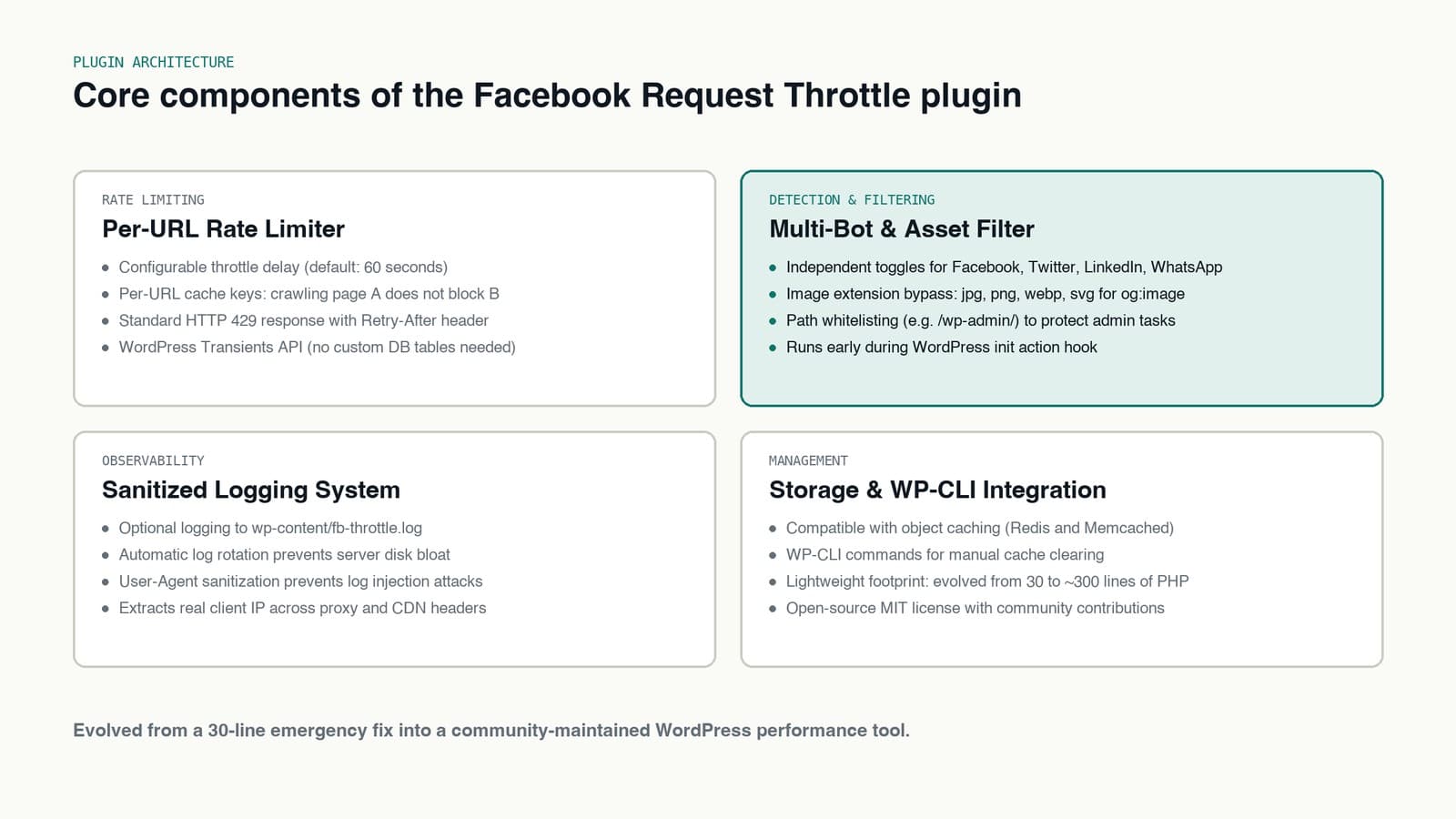
- Configurable delay between requests (default: 60 seconds)
- Per-URL throttling (crawling page A doesn't block page B)
- Per-bot throttle settings
- HTTP 429 response with
Retry-Afterheader (the standard rate-limiting response)
Visibility
- Optional logging to
wp-content/fb-throttle.log - Log rotation to prevent disk bloat
- Request details: timestamp, user agent, IP, action taken
Flexibility
- Whitelist specific paths (e.g.,
/wp-admin/) - Image request bypass
- WP-CLI commands for cache clearing
Installation
- Download from GitHub
- Upload to
wp-content/plugins/ - Activate in WordPress admin
- Configure under Settings → FB Throttle
Or manually with WP-CLI (download first, then install):
# Download the plugin
curl -L -o fb-throttle.zip https://github.com/nadimtuhin/Facebook-Request-Throttle-WordPress-Plugin/archive/main.zip

# Install and activate
wp plugin install fb-throttle.zip --activate
When to use this plugin
Good fit:
- Shared hosting with limited resources
- Sites that frequently go viral on social media
- WordPress installations seeing high crawler traffic in access logs
Not needed:
- Sites on dedicated servers with resources to spare
- Low-traffic blogs with occasional social shares
- If you're already using Cloudflare or similar with bot management
Lessons learned
Building this plugin taught me a few things about open-source maintenance:
Real users find real bugs. The image-blocking issue would never have surfaced in my testing. I don't share enough content on Facebook.
Logging is not optional. Users need to see what's happening. "Trust me, it's working" isn't good enough.
Start simple, expand based on need. The original plugin was 30 lines. Now it's ~300, but every addition came from a real use case.
Security considerations
When implementing crawler throttling, be aware of:
- User-agent spoofing: Any bot can claim to be
facebookexternalhit. This plugin is for rate limiting, not security. - Log injection: Always sanitize data before writing to logs (the code above demonstrates this).
- Race conditions: Under very high load, multiple requests may pass the throttle check simultaneously. For most sites, this is acceptable.
Get involved
The plugin is MIT-licensed and welcomes contributions:
- Report issues: Found a bug or edge case? Open an issue
- Contribute code: PRs welcome for new features or fixes
- Join the discussion: Discord Community
Final thoughts
What started as a 30-minute fix for a friend has become a useful tool for the WordPress community. The plugin now handles edge cases I never anticipated, thanks entirely to users who took the time to report problems and developers who contributed fixes.
If you're seeing facebookexternalhit flooding your access logs, give it a try. And if you find a bug, please tell me. That's how this thing keeps getting better.
Resources
- GitHub Repository
- Facebook Sharing Debugger - Test how Facebook sees your URLs
- WordPress Transients API - How the plugin stores access times